
In Pakistan today, having a mobile phone is essential for staying connected with people around the world. Now a mobile number is considered a key to get access to calls, SMS, mobile banking, and countless online services. Many people use more than one SIM card, making it common for them to forget their own phone number—especially if they have a new SIM or one that they do not use frequently.
According to the Pakistan Telecommunication Authority, Zong has 51.88 million total subscribers in Pakistan (as of June 2025), making it the country’s second-largest mobile network.
Why Knowing Your Zong Number Matters in 2025
A mobile number is now more than a contact number; it’s a gateway to access online registration and online apps and official verifications. Without it, you might face unnecessary delays or miss out on important communications.
Common Scenarios Where You Often Forget It
- Buying a new Zong SIM or recent purchase
- Managing multiple or dual SIMs can make it easy to mix up numbers.
- Infrequent use of Zong SIM may not recall the number.
- While switching devices can wipe out saved number details
- A rarely used SIM may slip your mind, especially if it’s been inactive for months.
- When you urgently need to share your number.
Quickest Ways to Check Your Zong Number
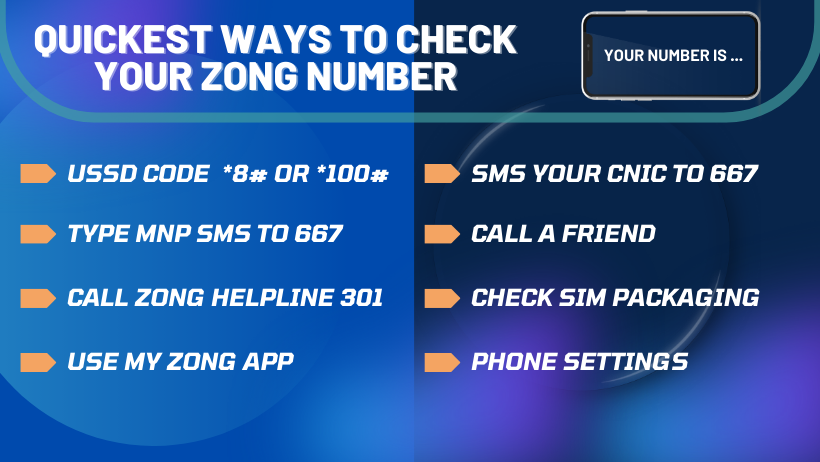
If you’ve forgotten your Zong number, no need to worry. To check your Zong mobile number in Pakistan, there are several quick methods to retrieve it; you can use one of these simple methods.
- USSD Code (Free & Instant)
- Open your phone’s dialer.
- Dial *8# or *100#.
- Your Zong number will instantly appear on the screen.
- Note: Codes may vary by region, so check Zong’s official website if you encounter issues.
- Send SMS to 667
- Open your message box.
- Type MNP and send it to 667.
- You’ll receive an SMS containing your Zong number and SIM details.
- (Standard SMS charges may apply.)
- Call Zong Helpline (310)
- Dial 310 from your zong SIM card
- Follow the automated instructions, or talk to a customer service agent to confirm your number.
- Use My Zong App (Requires Internet):
- Download the “My Zong App” from Google Play Store or Apple App Store.
- Register or log in with your Zong number.
- Your Zong number will be displayed on the home screen.
- Sending Your CNIC via SMS to 667
- Open the Messages/SMS app on your Zong SIM.
- Type your 13-digit CNIC number (without dashes).
- Send it to 667.
- You’ll receive an SMS containing details about the SIMs registered on that CNIC, including your Zong number.
- Call a Friend:
- Call or text a friend’s number using your Zong SIM.
- Ask them to share the number shown.
- Check SIM Packaging:
- Check your original SIM card packaging
- your Zong number is usually printed on the SIM holder or package.
- Phone Settings (Device-Dependent):
- Go to your phone’s Settings > About Phone > Status > SIM Status.
- Look for “My Phone Number.”
- Note: This may not work on all devices.
Quick Comparison of Zong Number Check Methods
A quick comparison table is provided for users to review at a glance.
| Method | Speed | Cost | Internet Required | Ease of Use | Function |
|---|---|---|---|---|---|
| USSD Code (*8#, *2#, *100#) | Instant | Free | No | Very Easy | Fastest and most reliable method. |
| Send SMS to 667 | Fast | SMS charges | No | Easy | Returns SIM details along with number. |
| Call Zong Helpline (310) | Moderate | Call charges | No | Moderate | Requires following IVR or talking to an agent. |
| Use My Zong App | Fast | Free | Yes | Easy | Shows number on dashboard after login. |
| Send CNIC via SMS to 667 | Fast | SMS charges | No | Easy | Useful for checking all numbers registered on CNIC. |
| Call a Friend | Fast | Call charges | No | Easy | Your number will appear on your friend’s screen. |
| Check SIM Packaging | Slow | Free | No | Easy | Works only if you still have the original SIM card jacket/pack. |
| Phone Settings (Device-Dependent) | Moderate | Free | No | Varies | On some phones, SIM info is visible under “About Phone” or settings. |
Pro Tips to Never Forget Your Zong Number Again in 2025
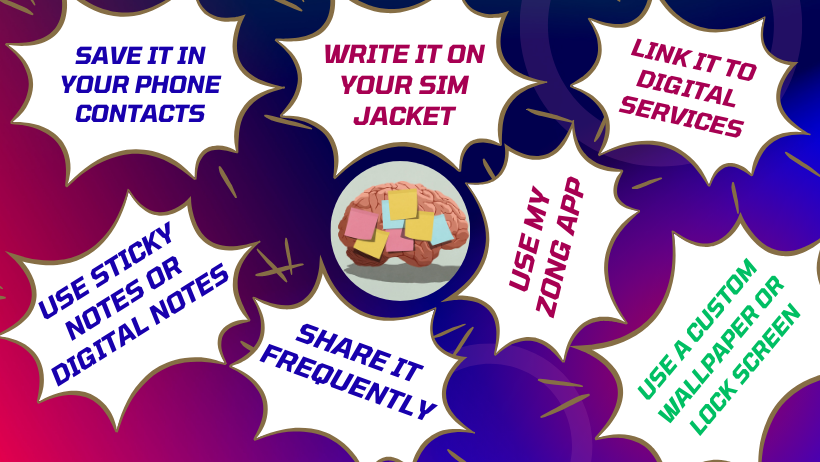
In today’s fast-paced world and with the pressures of work, it’s common for people to forget their Zong number. However, there are some simple tips and tricks to help you find it. Here we discuss a few tips.
- Save It in Your Phone Contacts: Save your number with an easily recognized name like “My Zong Number” or “Zong SIM.”
- Write It on Your SIM Jacket: Carefully place the SIM jacket somewhere and note your contact number on it.
- Use Sticky Notes or Digital Notes: Note down your contact number on a sticky note or any digital notes.
- Link It to Digital Services: Register your Zong number with frequently used apps like WhatsApp, Easypaisa, or JazzCash. When you open these apps, your number will display on the screen.
- Use My Zong App: Download the My Zong App. After registering, your number is displayed on the dashboard every time you log in.
- Share It Frequently: The more you give your number to friends or use it for registrations, the quicker you will memorize it.
- Use a Custom Wallpaper or Lock Screen: Set your phone’s lock screen or wallpaper with your Zong number.
Other Handy Zong Services You Can Use
In addition to verifying your number, Zong offers several useful features that make SIM management easier:
- Dial *222# to check your balance.
- Dial *102# to see Internet Data.
- Dial *102# for SMS & Minutes Check.
- Dial *911# to get an emergency Zong loan.
- Dial 101PIN# to recharge your account.
- Dial *6464# to explore Zong Packages.
- Dial 310 for the Customer Care Helpline.
Looking Ahead Zong in 2025
In 2025, it is not only about calls and SMS but it’s the door to quicker internet, smarter tools, and a digital-first lifestyle.
- 5G Expansion for quicker connectivity.
- Digital Ecosystem
- Eco-Friendly Initiatives
- AI-Powered Customer Care
- Facial Recognition for SIM Verification.
- eSIM for a hassle-free device integration.
Conclusion
If you can’t recall your Zong number, there’s no need to worry; simply dial *8#, use the My Zong App, or send an SMS to 667. With Zong’s expanding 4G network and its range of services, staying connected in 2025 has become easier, faster, and more secure than ever.
Frequently Asked Questions
The current free and instant USSD code to check your Zong number is *8#.
Yes, you can check your Zong number without balance by dialing *8#.
It shows “Unknown Number” if your SIM details aren’t stored.
Yes, these methods work for both prepaid and postpaid Zong SIMs.
There is no limit to check your Zong number.
If nothing works, call the Zong helpline 310 or visit the nearest Zong service center.